PowerCoders Bootcamp — Learning Journey
Hi reader, I decided to write about the experiences that I gained and what I learned in the PowerCoders bootcamp. It is the first time that I participated in an IT course. For this reason I thought it would be nice to have an article that I can look back to in the future :)
# table of contents
# week 1 — CLI, Git & GitHub
In the bootcamp we started to learn CLI. Luckily I had a bit of knowledge :D. We continued to learn the basics of git&github. I uploaded some repositories on github before but with teammates it was different than working alone. Together we experienced some of the most common conflicts and errors. In the last day of the week Densy, Anna and me created a small game on CLI. Game is here. It was our first experience of creating something together and presenting it.
# week 2 — HTML & CSS
We started the week with HTML-101. After a quick look at the terminology and history, we learned common HTML tags and elements.
There were basic rules and hierarchies that we needed to know when we started. I think the most important thing to remember here
was that I should use semantic tags as much as possible instead of div div div :) There was also something I knew wrong: I must
choose the tag which is best describing my content. For example, I used the <h1> tag
only for large fonts... I put some examples and exercises from the second week below.
An example navigation bar:
<nav>
    <ul>
        <li><a href="#">a</a></li>
        <li><a href="#">few</a></li>
        <li><a href="#">links</a></li>
    </ul>
</nav>
An example form:
<fieldset>
    <legend>Contact Details</legend>
    <label for="first-name">First name *</label>
    <input type="text" id="first-name" name="fname" required>

    <label for="last-name">Last name *</label>
    <input type="text" id="last-name" name="lname" required>

    <label for="email">Email Address *</label>
    <input type="email" id="email" name="email" required>

    <button type="submit">Submit</button>
</fieldset>
A question that asks us to predict what the outcome will be:
<style>
    p {
    color: rgb(255, 255, 255);
    background-color: rgb(0, 0, 0);
    text-decoration: none;
    border: 1px solid rgb(0, 0, 0);
    }
    p.info {
    background-color: rgba(0, 0, 255, 0.5);
    text-decoration: underline;
    padding: 1em;
    }
</style>
Answer: p.info is higher because it has two hits.

# week 3 — CSS Box Model & Programming 101
After the Easter holidays we continued with CSS - Box Model & Layout techniques and programming 101.
CSS - Box Model & Layout techniques
Especially on CSS we needed to pay attention to best practices because later it will be easier to configure responsive or ensure 3rd party plugins and all browsers styled correctly.
Below is my fantastic sticky footer exercise which I made during the lesson :)

Another example for footer with grid:
/* min-width 1025px */
@media only screen and (min-width: 64.063em) {
    footer {
        grid-template-areas: "nav nav h3 h3"
                             "nav nav p p"
                             "address address address address";
        width: 100%;
    }
    footer div {
        width: auto;
    }
    footer nav {
        grid-area: nav;
    }
    footer > h3 {
        grid-area: h3;
    }
    footer p {
        grid-area: p;
    }
    footer address {
        grid-area: address;
    }
}
Introduction to Programming
During introduction to programming we learned about How to think like a programmer?, How to solve problems? and The process to write a program.
- 1. Understand — Read the problem several times until you can explain it to someone else in plain English.
- 2. Plan — Take time to analyze the problem and process the information. Think very precisely about how you solve the problem.
- 3. Divide & conquer — Do not try to solve one big problem. Break it down into steps. Steps that are so simple that a computer can execute them.
- 4. Don't get frustrated — Debug, reassess and research.
- 5. Practice — The more problems you solve, the more research you do on other programmers solving the same problem, the more you think like a programmer.
Pseudo Codes
Pseudocode is a plain language description of the steps in an algorithm or another system. Pseudocode often uses structural conventions of a normal programming language, but is intended for human reading rather than machine reading. [Wikipedia]
Sample pseudo code exercise:
#QUESTION

Darkness phobia
One family wants to get through a tunnel. Dad can make it in 1 minute,
mama in 2 minutes, son in 4 and daughter in 5 minutes. Unfortunately,
not more than two persons can go through the narrow tunnel at one time,
moving at the speed of the slower one.

Can they all make it to the other side if they have a torch that lasts
only 12 minutes and they are afraid of the dark?

#ANSWER

Solution:
speeds = person1 1, person2 2, person3 4, person4 5

locationA = 0
locationB = 0
sendlimit <= 2
returnLimit <= 1
walkingSpeed = slowest
maxTime = 12
torch = True
time = 0

check()
    if time <= maxTime
        raise Exception


updateTime(person_time_a, person_time_b)
    time += max(person_time_a, person_time_b)


count(args)
    lengthArgs = [args]
    return lengthArgs

control()
    if updateTime() and (locationA == 0 and locationB == 4)
        return True

# They are the fastest
Send person1 + person2 from location A to location B
if updateTime(person1, person2)
    locationB += count(person1,person2)
    locationA -= count(person1,person2)

# Because we need person1 for last step
Return person2 from location B to location A
if updateTime(person2)
locationB  -= count(person2) && locationA += count(person2)

# Person3 and Person4 have highest value
Send Person3 + Person4 from location A to location B
if updateTime(person3 + person4)
locationA -= count(person3,person4) && locationB += count(person3, person4)

# Person1 has a minimum value
Return Person1 from location B to location A
if updateTime(person1)
locationB -= count(person1) && locationA += count(person1)

# They are the last persons
Send Person1 + person2 from location A to location B
if updateTime(person1 + person2)
locationA += count(person1 + person2) locationB -= count(person1, person2)

if control() then "WIN"
# week 4 — Intro to JavaScript
We started the fourth week with an introduction to JS. After taking a look at the history of JS, we learned why we need it, possible use cases and how to implement it. Basically with JavaScript, we make the websites interactive. Some of the most common use cases are:
Web use cases
- → AJAX loaded content (loading parts of the content without refreshing the site)
- → Include external content (e.g. add Twitter feed)
- → Form validation and process data
- → Overlay elements and lightboxes
- → Sliders, tabs and accordions
- → Website tracking
- → Drawing and animation
Building blocks of Programming
- → Data Types
- → Variables
- → Conditions
- → Loops
- → Functions
Data Types
Indicate in JavaScript what types of value are possible and which kind of operations: Number, String, Boolean, Undefined, Null, Symbol (new in ES6), Object.
An example exercise of the first day:
// Exercises 3

// Printing quotes
// Create a program that prompts for a quote and an author.
// Display the quotation and author as shown here:
// [Author] says, "[Quote]"

var author = prompt("Author name:")
var quote = prompt("Quote: ")
alert(`${author} says, "${quote}"`)
Conditions & Loops
Loops are used in JavaScript to perform repeated tasks based on a condition. Conditions typically return true or false. A loop will continue running until the defined condition returns false.
for (let i = 0; i <= 20; i++)
{
    if (i%2 == 0)
    {
        console.log(`${i} is even`)
    } else {
        console.log(`${i} is odd`)
    }
}
Functions
A JavaScript function is a block of code designed to perform a particular task. A JavaScript function is executed when "something" invokes it (calls it).
- → Code reuse: define the code once and use it many times
- → Different arguments: used with the same code will produce different results
JavaScript Object
In JavaScript, an object is a standalone entity, with properties and type. Compare it with a cup, for example. A cup is an object, with properties. A cup has a color, a design, weight, a material it is made of, etc. The same way, JavaScript objects can have properties, which define their characteristics.
DOM
Document Object Model that allows programs and scripts to dynamically access and update the content, structure, and style of a document.
Events
Events are notable things in the DOM that JavaScript detects and can react to. When an event occurs on a target element, a handler is executed. Events are an essential part of a dynamic website.
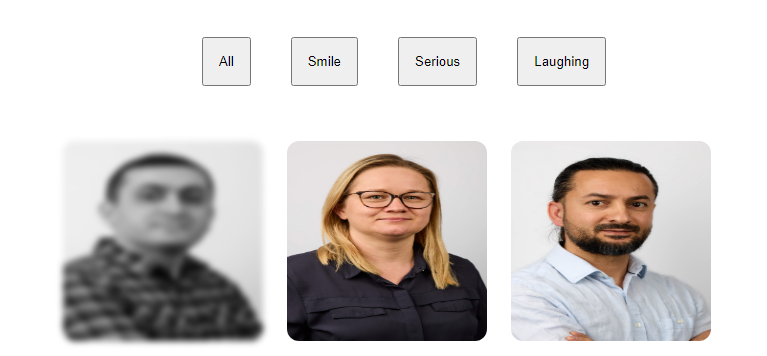
Photo Gallery Project
This JavaScript project is aimed at putting into practice the basics we learned this week.
# week 5 — JavaScript & DOM

At the beginning of this week, we repeated parts of what we have learned last week. We also learned some new things like algorithms, classes, prototypal inheritance, arrays and objects. Most important were the best practices of DOM and what can be the consequences of wrong use e.g. XSS :).
Algorithms and programming principles
What an algorithm is: An algorithm is a step-by-step set of operations that need to be performed. If you take an algorithm and write code to perform those operations, you end up with a computer program.
Different types of programming:
- → Declarative programming: Declares what is being done rather than how it should be done. Examples: SQL, HTML, CSS
- → Imperative programming: Focuses on how a task is done rather than what is being done. Examples: Java, JavaScript, Ruby
- → Procedural programming: Uses procedures, also known as routines, subroutines or functions, to operate on data structures and carry out tasks. Examples: Java, JavaScript, C, Pascal, Basic
- → Object-oriented programming: Involves building objects with data attributes and programming subroutines. Code reusability and inheritance are main concepts of today's dominant paradigm. Examples: Java, JavaScript, Python, PHP, C, C++, Ruby
Exercises of Day / Retirement Calculator:
var age = +prompt("What is your age? ")
var retiredAge = +prompt("At what age would you like to retire? ")

if ((isNaN(age) || isNaN(retiredAge)) || (age < 0 || retiredAge < 0)){
    console.log("Inputs are not valid")
} else if (age >= retiredAge) {
    console.log("Age cannot be smaller than retire age")
} else {
    var currentYear = new Date().getFullYear()
    var retire = retiredAge - age
    console.log(`You have ${retire} years left until you can retire.\nIt's ${currentYear}, so you can retire in ${currentYear + retire}`)
}
Objects and arrays
What is an object:
- →An Object can contain many values and help organize and structure them.
- →An Object is a data type (like numbers or strings), but also a data structure.
- →An Object is a collection of data types. They can even have methods (=functions) in them.
- →Think of a collection as a list of values that are written as key:value pairs.
What is an array:
- →Arrays store multiple values in a single variable.
- →
let topics = ["HTML","CSS","JS"]; - →An array is a special type of object.
- →An array is a collection of often similar data.
- →The items in an array have a guaranteed order (e.g. when sent from FE to BE).
- →An array can hold any data in JS: objects, numbers, strings ...
- →A multidimensional array contains arrays.
Exercises of day / Choices:
var choices = []

for (let i = 0; i <= 2; i++)
    choices.push(prompt("Enter your choices: "))

console.log(`My 1st choice: ${choices[0]}, My 2st choice: ${choices[1]}, My 3st choice: ${choices[2]},`)
Classes
Classes are templates for JavaScript objects. A newer notation for the object constructor function:
class Person {
  constructor(name, age, married) {
    this.name = name;
    this.age = age;
    this.isMarried = married;
  }
  hello() {
    return "Hello " + this.name;
  }
}
Inheritance is a way to share common logic in programming:
class Animal {
  constructor(name) {
    this.name = name;
  }
  jump() { console.log(`${this.name} is jumping.`); }
}
class Bird extends Animal {
  fly() { console.log(`${this.name} is flying.`); }
}
class Dog extends Animal {
  bark() { console.log(`${this.name} says "Woof!"`); }
}
Prototype Chain
- →Data is unique to every object (e.g. the animal name)
- →Methods are shared logic (e.g. jump())
- →Shared logic is stored on a shared object (prototype object)
- →Each object has a link to this prototype object (__proto__)
- →When a method is called: Is it defined on the current object? If yes call it. If no, is the method defined on the prototype object? If no, go up until the prototype object is null. Then the method is not defined at all.
Dynamic object properties
With [] in your property name, you can put in dynamic values, like another variable or a calculation.
const name = "first name";

const obj = {
  [name]: "Susanne",
  [5 + 13]: 38,
  experience: 13
}
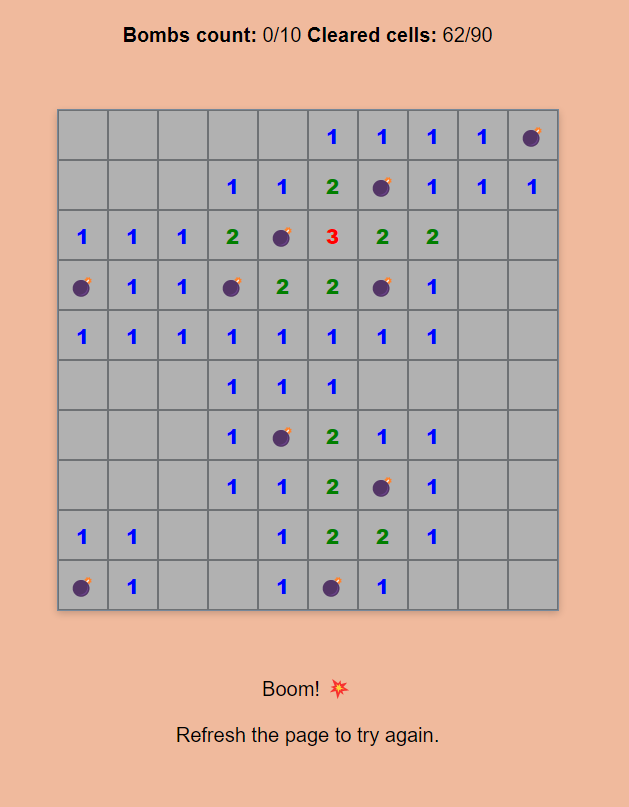
Exercises of day / Mine Sweeper
DOM and XSS
DOM: Document Object Model — Anything found in an HTML or XML document can be accessed, changed, deleted, or added by a programmer using the DOM. The DOM of an HTML document can be represented as a nested set of boxes, called DOM Tree.
let elm = document.getElementById("demo");
let arr = elm.childNodes;
arr.forEach(function(el){
  el.textContent = "new text";
});
JavaScript can be dangerous:
- →innerHTML — Inserts HTML
- →outerHTML — Inserts HTML
- →insertAdjacentHTML — Inserts HTML
- →eval — Evaluates JavaScript(!) — Never use this function
- →document.write() — Inserts HTML
- →document.writeln() — Inserts HTML
This code below is causing DOM XSS because it doesn't sanitize the user's input. Developers must always sanitize inputs and try to find more secure methods.
let urlDisplayElement = document.getElementById('urlDisplay');
let currentUrl = window.location;
urlDisplayElement.innerHTML = `Current url is: ${currentUrl}`
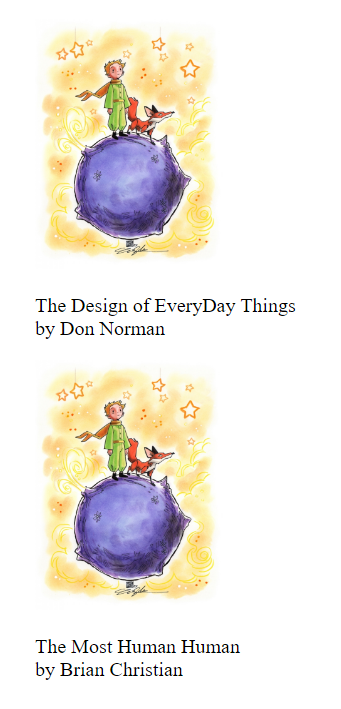
Exercises of day / Book store
# week 6 — Events, AJAX and JSON
In the sixth week, we learned event AJAX and JSON, which are important parts of dynamic websites. In this area, I have to do some more exercises. In my final project, I used some AJAX and events features. They are really useful for dynamic website development.
What are events?
Events are notable things in the DOM that JavaScript detects and can react to. When an event occurs on a target element, a handler is executed.
Common event types:
- →
onclick— occurs when the user clicks on an element - →
onload— occurs when an object has loaded - →
onunload— occurs once a page has unloaded (for body) - →
onchange— occurs when the content of a form element changed (for input, select, textarea) - →
onmouseover— occurs when the pointer is moved over an element or its children - →
onfocus— occurs when an element gets focus - →
onblur— occurs when an element loses focus
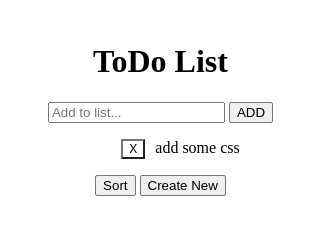
What is the essential of javascript events? Sure, it is ToDo App :) I also created my ToDo app..
What is AJAX?
AJAX is a developer's dream, because you can:
- →Read data from a web server - after a web page has loaded
- →Update a web page without reloading the page
- →Send data to a web server - in the background
Fetch API
Returns a promise: I promise to let you know when the response of my request is returned, then it returns a response with its own method json() to parse the response, then it returns an object with the data of your AJAX call.
fetch("https://jsonplaceholder.typicode.com/todos/1")
  .then(response => response.json())
  .then(data => console.log(data));
Exercises with event listeners: We created a background generator.

We are on the way to the interviews, time is running out :) I mainly focused on my final project and interview preparations. For this reason, I had to keep this week's blog a little short.
# week 7 — JS Practices & Final

This is our last week of the Powercoders bootcamp. The time past really fast. It was nice to learn the fundamentals of frontend technologies. Some exercises were also challenging. Most of what I've learnt in the bootcamp I used in my final project. You can visit it here click on this. This week was our career day. We had two days off to have time for the interviews.
TLDR; Our some exercises are below.
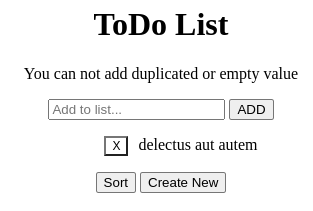
Improved ToDo
- 1.Use this API to get todos from an external source
- 2.Use the todos from the API as your todos
- 3.Add a form to the HTML to add new todos and remove the prompts (if you have not done that yet)
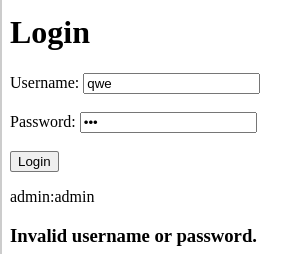
Build a user authentication
- 1.Create a local json file with several users and logins
- 2.Create a HTML file with a simple login
- 3.Check the login against your users.json
- 4.If login is correct, display a personal welcome message
- 5.Otherwise, display an error message
# resources
- → developer.mozilla
- → freecodecamp
- → w3school
- → bootcamp PDFs